Moving to Yamate › Tradify
How to export your data from Tradify
What to click in Tradify, which files you get, and what can’t come across. Checked 6 October 2026.
Customers
- Open Customers.
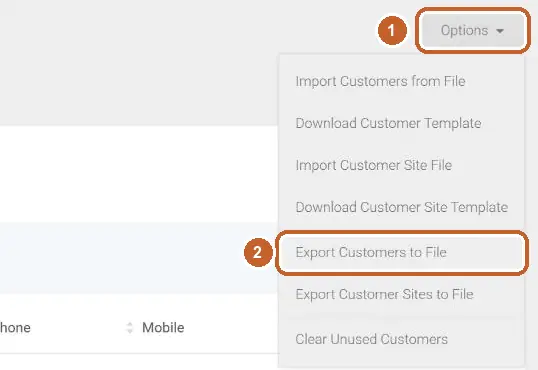
- Click Options at the top right, then Export Customers to File. Use Export Customer Sites to File too if your jobs are at different sites.
Invoices
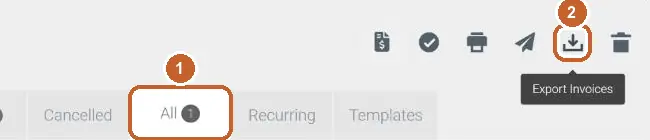
- Open Invoices and pick the All tab.
- Click the download icon, Export Invoices.
Quotes
- Open Quotes and pick the All tab.
- Click the download icon, Export Quotes.

Jobs
- Open Jobs.
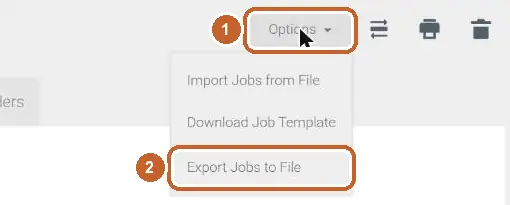
- Click Options, then Export Jobs to File. Only open jobs come across — finished ones arrive as their invoices.
Bills
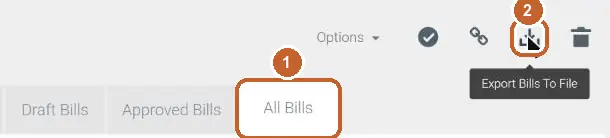
- Open Purchases and pick the All Bills tab.
- Click the download icon, Export Bills To File. Keep the word bills in the file name.
Suppliers
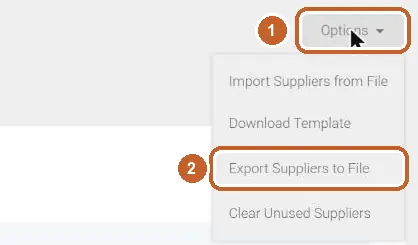
- Open Contacts → Suppliers.
- Click Options, then Export Suppliers to File.
Price list and supplier price lists
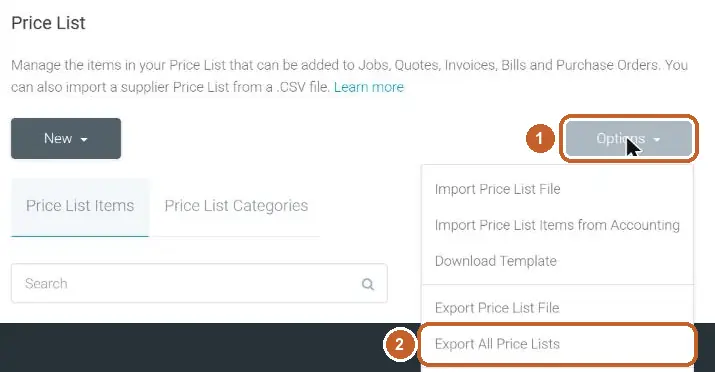
- Open Settings → Price List.
- Click Options, then Export All Price Lists.
What can’t come across
- Job notes and files
- Recurring job templates
Then bring it into Yamate
- Open Yamate and go to Settings → Your data → Import data. New accounts are asked once, after the welcome.
- Drop all the files in at once — CSV, Excel or ZIP. They are read on your phone or computer.
- Check the tick-list. Owed invoices stay owed, paid ones count as paid, and nothing you already have is changed.
- Tap Add. Anything you untick is left out.
Checked 6 October 2026 in a real Tradify account and against Tradify’s own help pages. Yamate isn’t affiliated with Tradify; the name belongs to its owner.
- help.tradifyhq.com/hc/en-us/articles/4402065079705 — read 29 September 2026
- go.tradifyhq.com/ — read 6 October 2026